
Spec Sheet: What It Is, Types, Uses, and How to Create One

A spec sheet records the product requirements you want suppliers to review. For an initial discussion, start with a product name, photo, link, or rough dimensions. Separate confirmed requirements from estimates, reference details, and unknowns. Keep supplier assumptions and later changes tied to the version they reviewed.
What Is a Specification Sheet?
A specification sheet is a clear, standardized document that outlines a product's physical features and technical characteristics. Components and materials may also have spec sheets that explain their properties, performance characteristics, and intended applications.
People often use terms like technical sheet, product information sheet, or product spec sheet to describe this document. These terms may vary slightly by industry and context. However, they share an essential purpose of documenting product characteristics using measurable, verifiable data. As such, stakeholders like customers, suppliers, quality assurance testers, engineers, and sales teams often reference them.
Differences Between Specification Sheets and Other Product Information Documents
Although similar documents like datasheets, product brochures, and fact sheets exist, you shouldn’t confuse them with specification sheets. A data sheet often focuses on detailed technical performance, especially in engineering and electronics.
On the other hand, a product brochure contains information like key features, benefits, and images. It serves as a marketing tool, using persuasive language to attract buyers. A fact sheet is typically brief and summarizes essential information about a product.
In contrast, a product specification sheet presents structured, measurable product data in a standardized format intended for technical, operational, and sourcing decisions. It is comprehensive, yet structured, compact, and readable. Specification sheets are designed to be usable by both technical and non-technical audiences.
Types of Specification Sheets and When to Use Them
The scope and focus of specification sheets vary depending on the application, purpose, and audience. As a result, they can take on several forms, tailored to reflect industries, lifecycle stages, and users. Here are the types of spec sheets, their roles, and appropriate instances for using them.
- Product specification sheets: They provide factual information on commercial goods for reference and ensure consistency in communication. Companies can use them to support marketing and sales processes or to align internal teams on product details.
- Technical specification sheets: They contain engineering-grade specifications, such as tolerances and measurements, as well as performance metrics. Engineers and technical experts use them to test performance and suitability before implementation.
- Material or component specification sheets: They describe raw production materials. This document is useful for suppliers, who can use it to verify material composition and property data when sourcing components.
- Design or functional specification sheets: They state how the product should look and interact.
Key Elements of a Specification Sheet
A specification sheet acts as a central reference. To promote clarity and understanding, companies organize the content in a standardized format. Here are the main elements in product specification sheets:
| Spec Sheet Element | Primary Users | Decision It Supports |
|---|---|---|
| Header & Identification Data | Buyers, Sales Teams | Confirms product identity and version accuracy |
| Physical Details | Buyers, Logistics Team | Assesses fit, storage, transport, and space requirements |
| Construction Materials | Engineers, Manufacturers | Verifies material suitability and production feasibility |
| Performance Specifications | Buyers, Engineers | Confirms operational capability and performance limits |
| Standards & Compliance | QA, Compliance Officers | Identifies applicable requirements and evidence needing review |
| Compatibility | Engineers, IT Teams | Determines integration with existing systems |
| Warranty & Lifecycle Information | Buyers, Support Teams | Sets expectations for durability and support |
| Notes & Instructions | End Users, Support Teams | Guides correct use and reduces misuse or errors |
- Header information: This section contains basic identifiers like name, brand, version, and model. With this, readers can know what a product is, identify its source, and its modification level, preventing them from confusing it with similar products.
- Identification data: Here you can find the Stock Keeping Unit (SKU), which serves as an inventory tracking ID. It also includes the manufacturer-assigned product code and the revision date for documentation and update checks.
- Physical details: This section comprises the height, depth, width, and other dimensions. It also includes the product’s color, weight, packaging information, and other physical attributes that help transporters and buyers assess space requirements.
- Construction materials: A list of the materials in the product with their qualities and standards. For example, if steel is a material, you’ll find its grade, strength, density, and other information alongside the construction method.
- Functionality and performance specifications: This section outlines the product’s capacity, power consumption, and speed. Companies use this section to define operational capabilities and limits. This enables users to confirm whether it meets their operational requirements.
- Standards, safety, and compliance regulations: Here you’ll find the industry and safety standards to which the product adheres. It includes key certifications, safety ratings, and compliance requirements.
- Compatibility: This section outlines what other tools the product can work with. Hence, customers, engineers, and IT personnel can seamlessly integrate the tool and explore other use cases.
- Warranty, support, and lifecycle information: This section may outline warranty coverage, support terms, expected product lifespan, and service conditions. It may also cover the claims process and how to access support.
- Notes and instructions: In this segment, you’ll find tips on how to use the product correctly. It also includes warnings about what to avoid when using the product, storage instructions, and troubleshooting tips to improve the user experience.
Each section reflects different elements, so users can scan through and easily collect the information they need.
How to Create a Specification Sheet
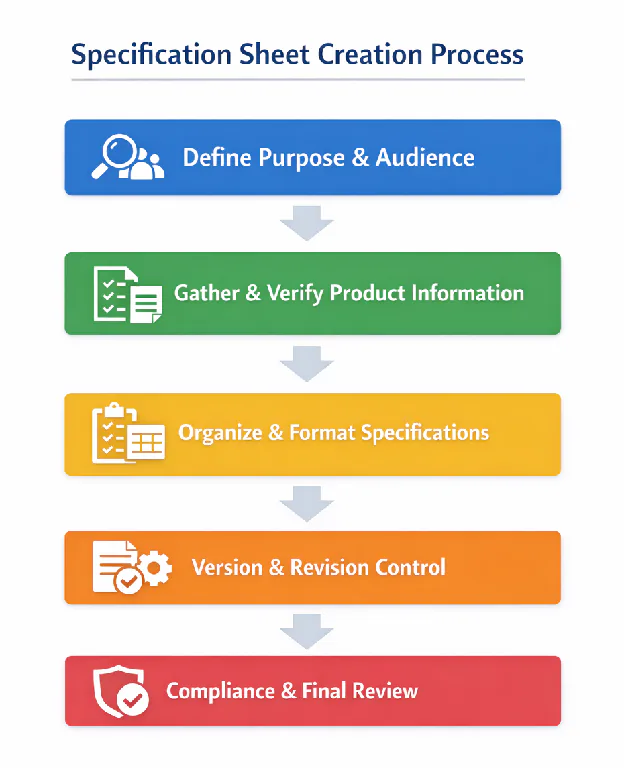
A good specification document provides sufficient information, presents technical details clearly, is concise, and serves as a guide. Here are the steps for creating a professional product sheet.
Start with a Minimum Sourcing Brief
A photo, a product link, or rough specifications are enough to start discussing what you need. Record what you know, label estimates, and list what the supplier needs to confirm. Use this brief for an initial feasibility check or an indicative quote. Confirm the price-critical and acceptance requirements before asking suppliers for comparable firm quotes or placing an order.
| Field | What to record first | Example |
|---|---|---|
| Product and reference | Product name or description. Add the photo, link, or rough dimensions you have. | Zippered storage pouch. Attach reference image A. |
| Intended use | What the product needs to do. Separate essential features from preferences. | Organize charging cables and small accessories. The pouch must close along the long edge. |
| Expected quantity | Initial order or estimated range. Label possible repeat volumes as forecasts. | Estimated first order: 500–1,000 units. Ask for pricing at both quantities. |
| Target market | Destination market, plus any product or packaging requirements already confirmed for it. | United States. Packaging format and labeling requirements are still open. |
| Fields to clarify | Unknown values, who needs to confirm them, and what the supplier should return. | Buyer to confirm final dimensions. Supplier to propose fabric and zipper options and state the basis for any indicative price. |
Step 1: Define the Purpose and Audience
Start by noting the class of stakeholders that’ll use the sheet and what they will use it for. Sales teams may need descriptive data to aid marketing, while buyers look for functionality and benefits.
Understanding this will help you decide on the best layout and format for the document. It’ll also help you determine which information to include and the appropriate language complexity.
Step 2: Gather and Verify Product Information
Contact the necessary professionals, teams, and departments to collect and compile the necessary information. Even minor errors can lead to miscommunication, rework, and production delays. So, you must verify information across sources such as:
- Manufacturing records.
- Engineering documents.
- Supplier datasheets.
- Compliance reports and other sources.
Step 3: Organize Information into Clear Sections Using Simple Language
Use the main specification categories to organize the document. Place related details under a single category and write in a language appropriate for the intended audience. To ensure consistency, maintain the same measurement units and symbols.
Many organizations rely on templates to maintain consistency, so you can adopt one for all your product sheets. Also, for a compact appearance, format text with bullet points, charts, and tables. You can add diagrams to simplify complex information.
For a reference photo or product link, label what the supplier should copy and what is for reference only. Number the callouts and list any measurements that are estimates. Ask the supplier to confirm feasibility, state assumptions, and list deviations in writing.
The following pouch brief and supplier replies are illustrative. Number each feature on the reference image and use the same numbers in the clarification table. The dimensions, materials, and supplier replies demonstrate the process and are not records of an actual supplier exchange.
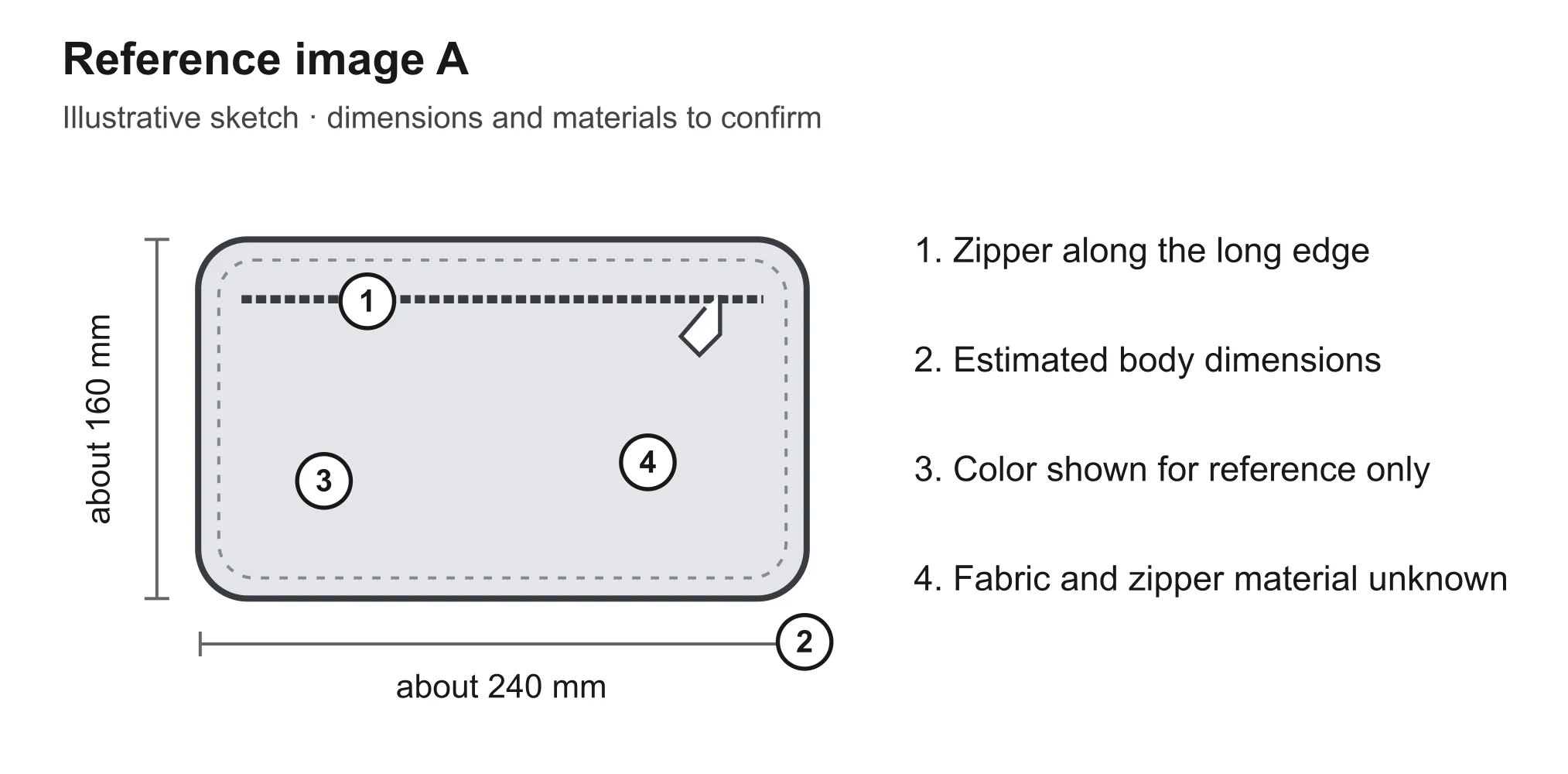
| Reference image A | Status | What to ask the supplier | Example supplier confirmation for v0.1 |
|---|---|---|---|
| 1. Zipper along the long edge | Confirmed requirement | Can you make this opening? List any deviation. | Long-edge opening is feasible. No deviation proposed. |
| 2. Pouch body, about 240 × 160 mm | Estimate | Give the dimensions used in your price. | Indicative quote assumes 240 × 160 mm. Final size awaits buyer confirmation. |
| 3. Color shown in the image | Reference only | List available colors. | Black and gray are available. Final color is pending. |
| 4. Fabric and zipper material | Unknown | Propose materials and identify which ones the quote assumes. | Indicative quote assumes 600D polyester and a nylon coil zipper. |
Record the supplier’s assumptions against the version they reviewed. Treat proposed dimensions and materials as pending until the buyer approves them.
Step 4: Indicate Revision and Version Control
Clearly indicate the product version and revision history, including issue dates and documented updates. It’s essential for tracking updates across product documents.
Proper version control prevents miscommunication. It also reduces the risk of confusion for suppliers when sourcing and assembling components. Furthermore, it provides clarity for engineers ascertaining measurements and other users.
Put the revision number and issue date on the sheet and its attachments. When a requirement changes, record the old and new values, send the new revision to affected suppliers, and ask each supplier to confirm the version they received. If the change affects price or delivery, request a revised quote. Keep the old quote for reference and mark it superseded for the current comparison.
Receipt does not mean acceptance of the changed requirements. Ask each supplier to identify any feasibility issue, changed assumption, or price and delivery impact before using its revised quotation in the comparison.
| Spec version | Issue date | Change | Supplier acknowledgment | Quote record |
|---|---|---|---|---|
| v0.1 | 12 Oct | Initial brief. Body size estimated at 240 × 160 mm. Fabric and zipper material open. | 13 Oct: Supplier confirmed v0.1 and listed its material assumptions. | Q-01 is indicative and based on v0.1. |
| v0.2 | 15 Oct | Confirmed body size at 250 × 170 mm, 600D polyester, and a nylon coil zipper. | 16 Oct: Supplier confirmed v0.2 and issued Q-02 for the updated size and materials. | Q-01 superseded for this comparison. Use Q-02 when comparing offers on v0.2. |
Step 5: Review for Compliance and Usability
Identify the requirements that apply to the product, intended use, and destination market. Record the supporting document, product or material covered, source, and review status. Listing a standard or supplier claim does not establish compliance. Have the responsible technical or compliance reviewer assess the evidence.
Get non-technical users to read the spec sheet and test their understanding to determine usability. Ask for feedback to identify unclear areas, then simplify them before distributing the document.
Tools and Software for Creating Spec Sheets
Use a shared document or spreadsheet that suppliers can open and your team can maintain. Keep the current file, attachments, and revision log together. Assign an owner to approve updates and control which version suppliers should use.
How ChinaSource Helps Operationalize Spec Sheets in Supplier Sourcing
To begin with ChinaSource, share a product name, photo, or reference link when you start a supplier search. Use the brief to capture what you know, what remains undecided, and which version a supplier reviewed. Technical requirements and changes need approval from the responsible buyer or specialist.
Use the Same Version for Supplier Replies
Ask each supplier to identify the specification version behind its reply, state assumptions, and list deviations. Keep provisional answers separate from approved requirements. Before you compare supplier quotations, confirm that the offers refer to the same current requirements.
Applying Specification Sheets in Manufacturing and Engineering
By providing clear input, technical sheets reduce ambiguity, leading to a more structured workflow. Besides this, workers in the engineering and manufacturing fields use them to:
- Verify and adhere to established parameters to build stable frameworks and ensure consistent product appearance.
- Test subsequent productions against the baseline standards.
- Track product changes and upgrades to improve configuration management.
- Troubleshoot system issues to locate faults and create solutions.
How to Use a Specification Sheet
A specification sheet is only useful when users can extract information and use it to achieve their goals. The following steps explain how stakeholders can use these sheets effectively.
Step 1: Identify the Product
Regardless of your aim, the first thing to do is to confirm that the basic identifiers, such as brand, name, model, and version, match the product you’re working with. With this check, you can confirm that you’re handling accurate information from the correct product sheet.
Step 2: Scan Through the Categories and Key Elements
Before reading the entire document, scan the headers to get an overview of its content. If you’re looking for specific details, this step will help you zero in on them swiftly. You’ll find this helpful, especially if the technical sheet is lengthy.
Step 3: Evaluate Relevant Details
Since the purpose of product sheets varies by role, you should focus on the information most beneficial to you. Customers may prioritize warranty terms, features, and compatibility while logistics personnel note the handling requirements, weight, and packaging. Through contextual evaluation, you can better understand the product’s suitability and notice its shortcomings.
Step 4: Apply the Data to Your Task
You can now apply the insight gotten from the data as a guide or benchmark for decision-making. For instance, engineers can use it as a blueprint to build systems with compatible components. Logistics teams use packaging and weight information to optimize storage and transportation, while customers focus on product comparison.
Best Practices and Common Mistakes to Avoid
Here are proven practices to improve the quality of your specification sheet, and also pitfalls to avoid.
- Assign professionals to look out for errors.
- Use clear headings.
- Keep the information factual.
- Always add the revision date.
- Maintain a consistent format.
- Do not use ambiguous words.
- Include clear ownership or source identification.
These practices contribute to clarity and ease of interpretation while minimizing errors.
FAQ Section
What’s the Difference Between a Spec Sheet and a Datasheet?
A specification sheet typically presents structured product attributes for operational and purchasing decisions, while a datasheet often focuses on detailed technical performance parameters, particularly in engineering or electronics contexts. In practice, the terms are sometimes used interchangeably depending on the industry.
Why are Specification Sheets Important for Quality Control?
Spec sheets contain product compliance standards that quality assurance teams use when testing products for approval. By ensuring that each product matches necessary regulations and specifications, quality controllers maintain consistency and enforce compliance.
How Detailed Should a Specification Sheet Be for Supplier Sourcing and RFQs?
A spec sheet should be detailed enough that different suppliers interpret the requirements the same way. For an initial feasibility check, you can start with a photo, link, or rough specifications and label what still needs confirmation. For comparable firm RFQ responses, include confirmed material grades, dimensions, tolerances, performance criteria, testing standards, packaging requirements, and compliance needs where relevant.
If key details are missing, suppliers will make their own assumptions. One supplier may price a higher-grade material, while another may quote a lower-grade alternative. This leads to large price gaps and makes side-by-side comparison difficult. Detailed and clear specifications help ensure that all suppliers quote against the same requirements, which improves pricing accuracy and lowers production risk.
What Are Common Mistakes in Writing a Specification Sheet?
The most common mistake is missing key details. Buyers sometimes leave out material grade, tolerances, surface finish, or packaging instructions. Without clear numbers and limits, suppliers make their own assumptions. Another issue is using a broad label instead of identifying the product-specific requirements and evidence needed for the intended use and destination market. Some spec sheets also use vague terms like "high quality" instead of clear numbers and measurable standards. This leads to price gaps and production problems.
Who is Responsible for Creating and Maintaining a Specification Sheet?
The creation and maintenance of specification sheets require the combined effort of various teams. Technical writers collect input from engineers, product managers, and quality assurance officers before drafting the document. After publication, operations teams manage version control, enabling writers to update their content.
Final Thought
Specification sheets are an invaluable resource for product-based businesses in major sectors, as well as professionals, specialists, and consumers. They support the transition from product ideas to reliable, scalable outcomes. They reduce execution risk, support compliance, and help prevent costly downstream errors across sourcing, production, and delivery.
Spec sheets are operational tools that influence quality, speed, and decision-making throughout the product lifecycle. These factors become especially critical when working with external suppliers and manufacturers, where misaligned requirements can lead to cost overruns, delays, or quality issues. You need clear, well-defined specifications that make it easy to communicate requirements, evaluate options, and take deals forward.